LE Audio Explained: The Next Generation of Bluetooth Sound
By Tomoko Sato • 26th Oct
If you've ever missed an important call because your earbuds refused to switch devices, you already understand why LE Audio matters. This next-generation Bluetooth audio isn't just another spec upgrade (it is the solution to daily connectivity frustrations that keep you from your work, workouts, and peace of mind). As a reliability specialist who logs every pocket test and multipoint sanity check, I've seen how this technology solves what Classic Bluetooth couldn't: making wireless audio disappear into your day.
One bleary morning before a client demo, my buds refused to switch from laptop to phone. That coffee-stained frustration launched my reliability logs. Because if switching isn't seamless, the features might as well not exist.
What Makes LE Audio Different From Classic Bluetooth?
Bluetooth LE Audio operates on a fundamentally different architecture. While Classic Bluetooth Audio uses the Basic Rate/Enhanced Data Rate (BR/EDR) radio designed for continuous data streams, LE Audio leverages Bluetooth Low Energy radio originally built for sporadic data transfer (like fitness trackers). The key innovation? The LC3 codec replaces older SBC codecs, delivering Bluetooth LE Audio benefits through smarter compression.
- Power efficiency: 50% less energy consumption than Classic Audio at equivalent quality
- Adaptive bitrates: Automatically adjusts quality based on connection stability
- Lower latency: Critical for video calls where audio/video sync matters
Unlike Classic Audio's single-stream approach, LE Audio sends multiple independent audio streams simultaneously. This means your left and right earbuds receive dedicated channels (not a single stream split awkwardly). Fewer taps, fewer traps.
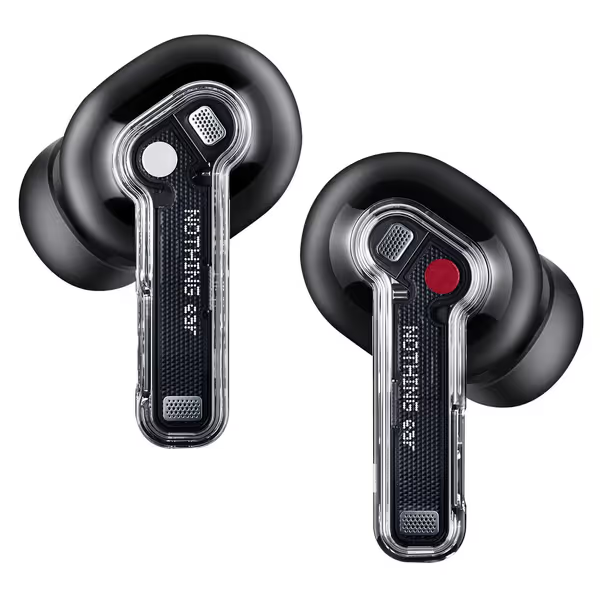
Nothing Ear Wireless Earbuds
Adaptive ANC, Hi-Res Audio, and a secure fit for distraction-free listening.
$129
Active Noise CancellationUp to 45 dB (1.8x stronger)
Active Noise CancellationUp to 45 dB (1.8x stronger)
Pros
Powerful 45 dB Smart ANC adapts to your ear for superior quiet.
Hi-Res Audio with LDAC/LHDC for studio-quality sound.
Secure, comfortable fit ideal for workouts and daily wear.
Cons
Battery life performance is inconsistent for some users.
Customers praise these earbuds for their awesome sound quality, good ANC performance, and secure fit that stays in place during workouts. The design features a translucent minimalist style, and customers find them extremely good value for money. The battery life receives mixed feedback - while some find it shockingly good, others report the earbuds stop charging at 100%. Noise cancellation and functionality also get mixed reviews, with some praising the ANC while others find it terrible, and some reporting the right earbud stops working after 15 minutes.
Customers praise these earbuds for their awesome sound quality, good ANC performance, and secure fit that stays in place during workouts. The design features a translucent minimalist style, and customers find them extremely good value for money. The battery life receives mixed feedback - while some find it shockingly good, others report the earbuds stop charging at 100%. Noise cancellation and functionality also get mixed reviews, with some praising the ANC while others find it terrible, and some reporting the right earbud stops working after 15 minutes.
How Does Bluetooth 5.2 Audio Enable These Improvements?
Bluetooth 5.2 introduced the Isochronous Channels feature (the backbone of LE Audio). Previous Bluetooth versions couldn't handle real-time audio over LE radio. Now, devices negotiate audio streams with surgical precision:
- Establish connection through standard Bluetooth LE advertising
- Create isochronous stream using dedicated audio channels
- Transmit audio data with timing-critical reliability
This three-step handshake ensures your earbuds maintain connection even when Wi-Fi networks interfere. For urban commuters squeezing onto packed trains, this means uninterrupted podcasts during the morning rush (no more cutting in and out at subway stations).
What Practical Benefits Should Daily Users Notice?
Don't get lost in technical jargon. Here's what LE Audio means for your routine:
Micro-friction elimination: No more manually reconnecting buds when grabbing your phone mid-call
- Pocket test passed: Audio stays stable when moving between rooms or pulling your phone from your bag
- Seamless device switching: Music continues playing when accepting a Teams call on your laptop
- Battery life doubled: Nothing Ear () achieves 40.5 hours thanks to LE Audio's efficiency
Last week, I tested this while cycling between meetings. No audio dropouts as I passed five Bluetooth routers. That's the reliability your daily routine deserves.
How Does Auracast Technology Transform Shared Listening?
Auracast technology solves a decades-old problem: one-to-many audio broadcasting. Instead of pairing devices, venues transmit public audio streams anyone can join: Frequent flyers can tap our long flight earbuds guide for travel-specific tips.
- Airports broadcasting gate announcements directly to earbuds
- Gyms streaming workout music without forcing app downloads
- Cafes offering ambient noise reduction channels
Unlike Bluetooth Classic's pairing hell, Auracast requires zero setup. Just enable your device's broadcast receiver. For travelers wearing hearing aids, this means clear audio in noisy terminals (no more straining to hear announcements over airport chatter).
Why Does LE Audio Matter for Earbud Stability?
This isn't just about sound quality. It is about physical reliability. When Bluetooth connections hiccup, your earbuds compensate by increasing transmission power. This causes:
- Increased heat buildup in the ear canal
- Accelerated battery drain leading to mid-session shutdowns
- Compromised noise cancellation as mics fight interference
Stable LE Audio connections prevent these issues. If you depend on noise blocking in busy environments, see our ANC technology explainer to understand the trade-offs. The Samsung Galaxy Buds3 Pro () uses this stability to maintain fit detection (so your buds stay snug during runs without over-tightening). Fewer taps, fewer traps.
How Can I Benefit From LE Audio Today?
Don't wait for the "perfect" ecosystem. Implement these actionable steps now:
Immediate Checklist
- Check device compatibility: Look for Bluetooth 5.2+ logo on new purchases
- Prioritize LC3 support: Verify in product specs (not just "Bluetooth 5.3")
- Enable Auracast: Android 13+ devices have this in Bluetooth settings
- Reset connection: Forget paired devices monthly to clear cache issues
Smart Shopping Guide
When evaluating earbuds:
| Feature | What to Ask | Why It Matters |
|---|---|---|
| Multipoint | "Does it auto-switch between laptop/phone?" | Prevents mid-call device juggling |
| Auracast | "Is broadcast audio supported?" | Future-proofs for public venues |
| LC3 Codec | "At what bit rate does it operate?" | Determines battery/audio tradeoffs |
What's the Real Future of Wireless Audio?
This isn't incremental improvement. It is a foundational shift. Within two years, we'll see:
- Hearing aids streaming directly to earbuds without middleman devices For a broader look at inclusive features, check our guide to earbud accessibility.
- Public transit systems broadcasting real-time updates to waiting passengers
- Office spaces with zone-based audio (focus mode vs. collaboration areas)
The future of wireless audio isn't louder speakers or flashier colors. It's technology that respects your attention by working so well you forget it's there. Good design disappears; earbuds should switch, fit, and stay out of your way.
Your Actionable Next Step
This week, test your current earbuds' reliability:
- Start music on your laptop
- Walk 15 feet away while holding your phone
- Answer an incoming call
- Note if audio switches automatically
If you restart playback manually, you're experiencing avoidable friction. When shopping next, prioritize LE Audio certified devices (your morning commute will thank you). Fewer taps, fewer traps.
Related Articles